You will need: a metal rod with a diameter of 3 mm (for example, a drill or a long screw), a ruler.
1. Remove the floor tunnel lining (see "Removal and installation the floor tunnel lining").
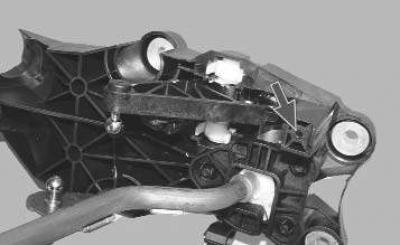
2. Set the gearbox control lever to neutral position and fix it by inserting a metal rod with a diameter of 3 mm into the fork of the linkage and into the hole of the linkage (this operation is shown on the removed linkage).
3. Remove the engine crankcase guard (if present).
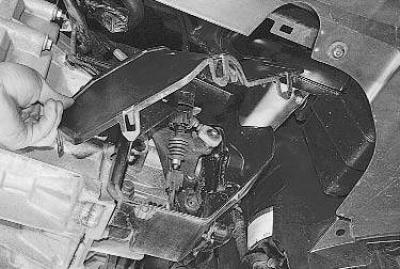
4. Remove the gearshift housing cover (see "Replacing gearbox control cables").
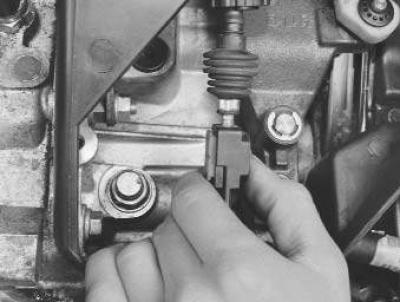
5. Unlock the gear selector cable end by pressing the end lock button (red)…
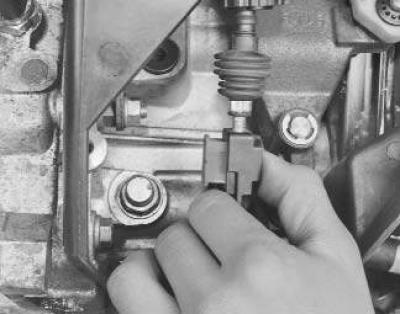
6. …and slide it out of the tip.
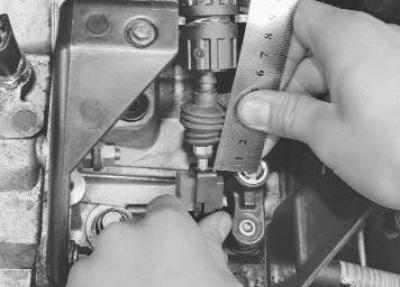
7. Move the gear selector lever all the way up (this will also move the tip up the cable). Measure the length of the threaded portion of the cable.
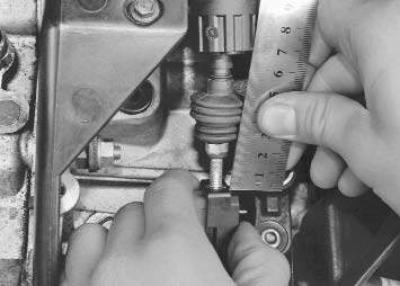
8. Move the lever all the way down and measure the length of the threaded part of the cable again (the difference between the two measurements is the value of the full stroke of the lever).
9. Move the lever up halfway and secure the tip to the cable by pressing the red button into the tip.
10. Install the gearshift housing cover.
11. Remove the locking rod from the hole in the gearshift lever linkage.
12. Start the engine and check that all gears engage clearly. Repeat the adjustment if necessary.
13. Install the floor tunnel lining.
The original post is on the web portal FORDBOOK