Ford Carburetor Automatic Starter Bimetallic Spring Housing
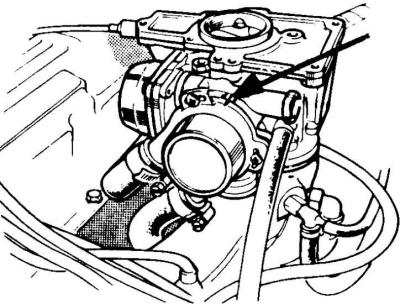
The arrow shows the setting signs for adjusting the operating time of the starting device (coincidence of the sign on the bimetallic spring housing with the first fixed sign on the left side indicates an earlier shutdown of the starting device).
1. Disconnect the battery and remove the air filter.
2. Unscrew the three Phillips-head screws securing the bimetallic spring housing and remove the trigger housing.
3. Remove the plug from the bottom of the housing.
4. Turn the control lever of the starting device so that the hole in its axis is opposite the hole in the housing.
5. Check the correct position through the hole in the casing.
6. Insert a drill of the appropriate diameter into the hole in the casing and make sure that it enters the hole in the axle of the starting device.
7. Loosen the nut on the control lever axle.
8. Without removing the drill, turn the trigger lever clockwise until it stops and tighten the nut on its axis.
9. Remove the drill and check the clearance and engine idle speed as follows: Turn the trigger lever so that the hole in its axis is opposite the hole in the housing.
10. Insert a drill of the appropriate diameter into the calibrated hole of the device and check whether it enters deep into the lever axis.
This article was borrowed from the website (FORDBOOK.ru)