Contents: Removal ↳ Installation ↳
On vehicles manufactured from 9/94 onwards, the light switch is part of a multi-function switch that also contains switches for the fog lights and rear fog lights. The switch cannot be disassembled.
Removal
Disconnect the negative (-) battery cable.
Caution: When the battery is disconnected, the contents of electronic memory devices, such as engine fault codes or radio codes, are erased. Before disconnecting, also read the instructions in the chapter "Removal and installation the battery".
Cars before 8/94: Remove the light switch knob.
Cars from 9/94
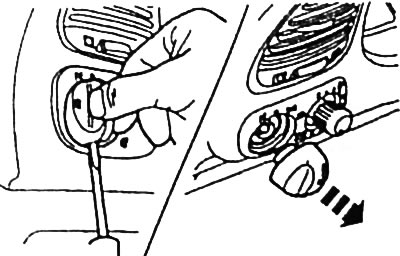
Use a small screwdriver to push down the lock and remove the rotary switch button.
Remove the headlight beam angle adjustment switch button.
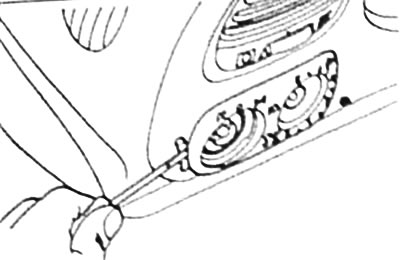
Using a screwdriver, pry up the switch cover from the outside, place a pad under the screwdriver, and remove the cover.
If necessary, replace the bulb. The fog light indicator lamp is located in the switch axis and can be removed directly. To replace the three symbolic designation illumination lamps on the cover, turn the bulb holder to the left and remove it. Remove the bulb from the holder and replace it with a new one.
All cars
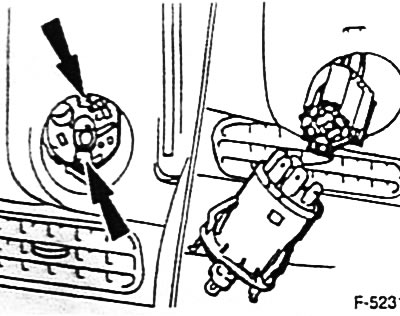
Squeeze both retaining tabs of the light switch arrow and remove the switch.
Disconnect the multi-pin plug connector of the switch.
Installation
Connect the multi-pin plug connector of the switch.
Insert the light switch.
Cars from 9/94: first place the light switch cover on the right side, then secure it on the left side.
Replace the light switch knob and, where available, the headlight beam angle adjustment knob.
Connect the ground (-) cable to the battery.
If available, set the clock and enter the radio theft protection code.
The original text is provided on an online resource [fordbook.ru]