1. Remove the right front wheel.
2. Remove the fender liner (see Removing and installing wheel mudguards and fender liners.
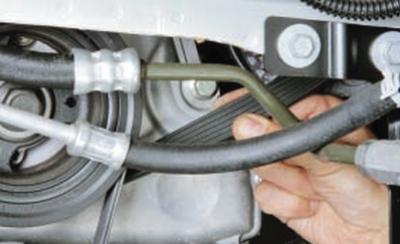
3. Check the belt tension. A correctly tensioned belt should turn 90° with a finger force of 15–20 N (1.5–2 kgf). If the belt is weakly tensioned (stretched over time), it must be replaced.
4. Check the condition of the belt by visual inspection. If the belt shows signs of severe wear or is oily, it must be replaced.
NOTE: A sign of wear on a multi-rib belt is a change in the shape of the ribs of the working surface. A new belt has trapezoidal ribs in cross-section, while a worn belt has acute-angled ribs.
5. Install the parts in the reverse order of removal.
Replacing the auxiliary drive belt on a 1.6L Duratec Ti-VCT engine is performed as follows.
NOTE: The accessory drive belt (alternator, water pump and power steering pump) must be replaced every 60,000 km or 6 years of operation (whichever comes first), as recommended by the manufacturer.
You will need: an 8 mm socket head, a 19 mm wrench, a special device for installing the belt, and a knife.
1. Raise the front of the vehicle and place it on a secure support. Remove the right front wheel.
2. Remove the right front fender liner (see Removing and installing wheel mudguards and fender liners).
3. Remove the protective cover of the auxiliary drive belts and the air conditioning compressor by unscrewing the bolts securing it to the engine using an 8 mm socket head.
4. Remove the air conditioning compressor drive belt.
NOTE: According to the manufacturer's recommendations, the accessory and air conditioner compressor drive belts must be cut with a knife for removal, after which they become unusable. This is because both belts cannot be reused even after removal without damage, since they are designed only for one-time stretching when installed on the pulleys (belt tension adjustment is not provided). In addition, belt replacement is regulated after a certain mileage or service life, therefore, when replacing the accessory drive belt, the air conditioner compressor drive belt should be replaced at the same time.
5. Remove the accessory drive belt by cutting it with a knife.
6. Wipe all accessory pulleys with a clean cloth to prevent accessory drive belt slippage during installation.
7. Install the new accessory drive belt onto the crankshaft, water pump and power steering pump pulleys so that the belt is located on the center of the pulley grooves. Install the tool onto the water pump pulley in the position shown in Fig. 5.13, pressing it until it clicks, indicating that the tool is fixed on the pulley.
CAUTION: Make sure the accessory drive belt installer retainer snaps onto the pulley and secures the installer securely. Otherwise, the belt will be damaged during installation.
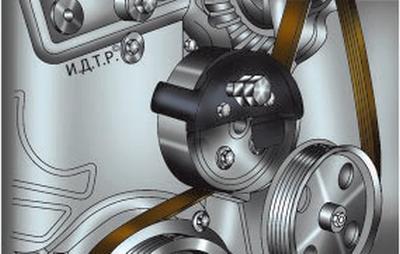
Fig. 5.13. Installing a device for mounting the accessory drive belt on the water pump pulley.
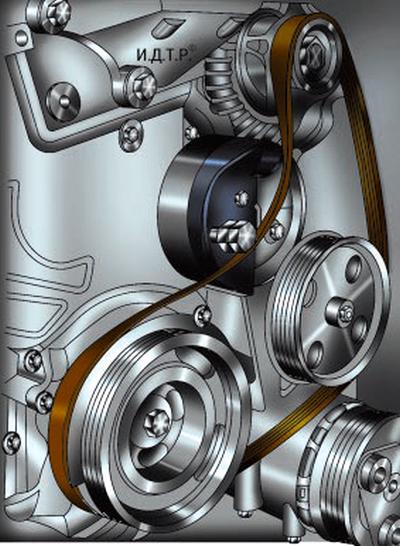
Fig. 5.14. Installation of the accessory drive belt mounting device and the initial position of the belt before installing the belt.
8. Remove the belt from the water pump pulley and install it on the alternator pulley.
Turn the belt mounting tool counterclockwise to the position shown in Fig. 5.14 and insert the belt behind the tool"s tab.
CAUTION: Make sure the belt is properly installed on the mounting fixture, otherwise it will be damaged during installation.
9. Engage 1st gear in a manual transmission (or set the automatic transmission selector to the "P" position – parking) and apply the parking brake to the vehicle to prevent the engine crankshaft from turning.
10. Turn the belt mounting tool clockwise by the bolt installed in it (Fig. 5.15) until the belt is installed on the water pump pulley (at this point the belt tension will be released).
CAUTION: Be careful not to get the installation tool caught between the belt and the water pump pulley, otherwise the belt will be damaged.
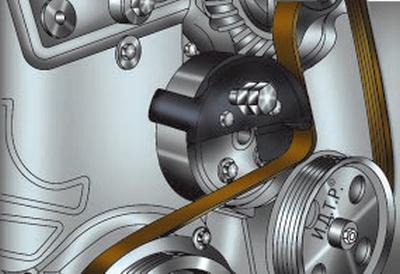
Fig. 5.15. Mounting the accessory drive belt on the water pump pulley.
11. Using a large screwdriver or a mounting blade, slide the mounting device off the water pump pulley, overcoming the resistance of its retainer.
12. Set the gearshift lever to neutral position.
13. Turn the crankshaft with a 19 mm wrench by the bolt securing its pulley approximately 90° to a position where the mounting device is not clamped by the belt, and remove it.
NOTE: The accessory drive belt mounting tool is single-use and is subject to deformation during installation.
14. Turn the engine crankshaft two revolutions and check the correct position of the belt in the pulley grooves. If necessary, reinstall the belt.
15. Install the air conditioning compressor drive belt.
16. Install the parts in the reverse order of removal.
Replacing the auxiliary drive belt for 2.0L and 2.3L Duratec-HE engines is performed as follows.
NOTE: According to the manufacturer's recommendation, the accessory drive belt (generator and water pump) must be changed every 60 thousand km or 6 years of operation (whichever comes first).
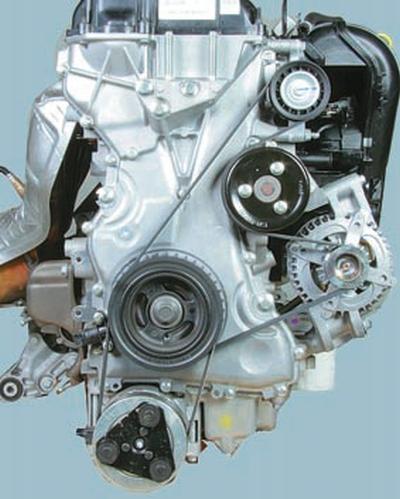
This is how the auxiliary drive belt is located on the engine.
You will need: socket heads "8" and "21", a special device for installing the belt, a knife.
1. Raise the front of the vehicle and place it on a secure support. Remove the right front wheel.
2. Remove the right front fender liner (see Removing and installing wheel mudguards and fender liners.
3. Remove the protective cover of the auxiliary drive belts and the air conditioning compressor by unscrewing the bolts securing it to the engine using an 8 mm socket head.
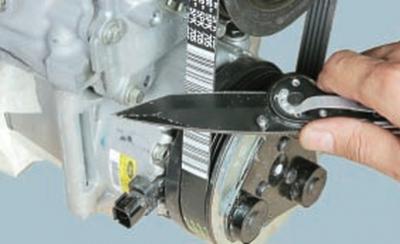
4. Remove the air conditioning compressor drive belt by cutting it with a knife.
NOTE: According to the manufacturer's recommendations, the accessory and air conditioner compressor drive belts must be cut with a knife for removal, after which they become unusable. This is because both belts cannot be reused even after removal without damage, since they are designed only for one-time stretching when installed on the pulleys (belt tension adjustment is not provided). In addition, belt replacement is regulated after a certain mileage or service life, therefore, when replacing the accessory drive belt, the air conditioner compressor drive belt should be replaced at the same time.
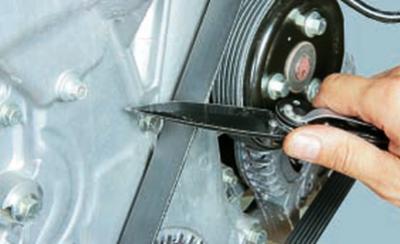
5. Remove the accessory drive belt by cutting it with a knife.
6. Wipe all accessory pulleys with a clean cloth to prevent accessory drive belt slippage during installation.
7. Install the new accessory drive belt onto the crankshaft, water pump and power steering pump pulleys so that the belt is located on the center of the pulley grooves.
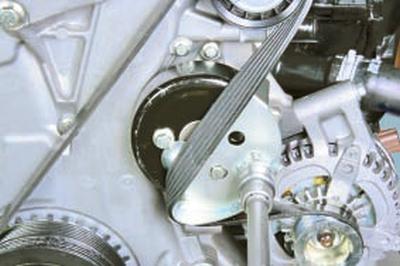
8. Install the mounting fixture onto the water pump pulley and turn the accessory drive belt mounting fixture clockwise until the belt is fully installed onto the water pump pulley (the belt tension will be released during installation).
NOTE: The accessory drive belt mounting tool is single-use and will become deformed during installation.
9. Turn the engine crankshaft two revolutions and check the correct position of the belt in the pulley grooves. If necessary, reinstall the belt.
10. Install the air conditioning compressor drive belt.
11. Install the parts in the reverse order of removal.