Contents: Removal ↳ Installation ↳
Generator mount with two bolts
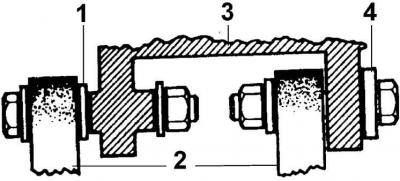
1 – small washer (may be missing), 2 – generator mounting bracket, 3 – generator, 4 – large washer
Removal
1. Disconnect the ground wire from the battery and also the multi-pin connector on the back of the generator (after removing the safety clasp).
Attention! This will erase the information in the electronic storage devices.
2. Loosen the generator mounting bolts.
3. Turn the generator towards the engine and remove the V-belt from the generator pulley.
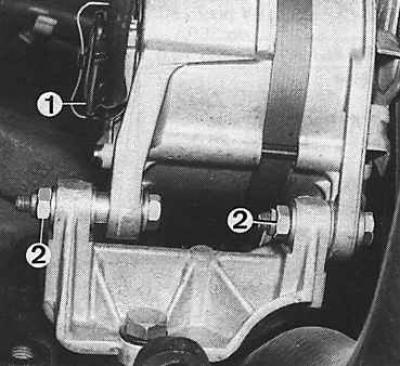
4. Unscrew the mounting bolts and remove the generator (1 – wire connection, 2 – lower mounting bolts).
Installation
1. Insert the generator, screw in the mounting bolts and tighten them by hand.
2. Connect and secure the multi-pin wire connector at the rear of the generator.
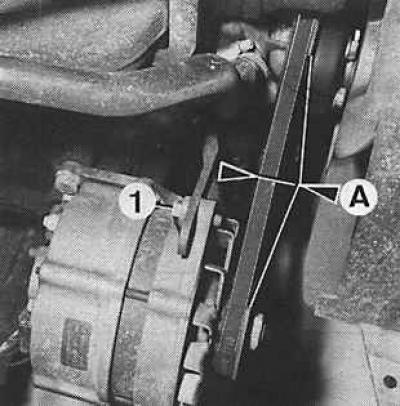
3. Install and tension the V-belt (1 – tensioner bolt, A = 10 mm – belt deflection).
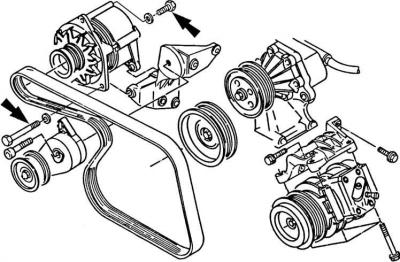
4. Tighten the tension adjustment bolt, then the front bolt (arrow) of the lower mount, and finally the rear bolt (arrow) of the lower generator mount.
5. Connect the ground wire to the battery.
6. Check the tension of the V-belt.
7. If necessary, loosen the generator mounting bolts, tighten the V-belt and retighten the bolts, starting with the tension adjustment bolt, then the front and rear generator mounting bolts.
(The text was obtained in its entirety from the specified website FORDBOOK.RU)