(Fig. 10.4) on the control panel. The door locks will be locked, the security mode will be activated, the direction indicators will flash once, and the immobilizer indicator lamp located in the instrument cluster will switch to slow flashing mode.
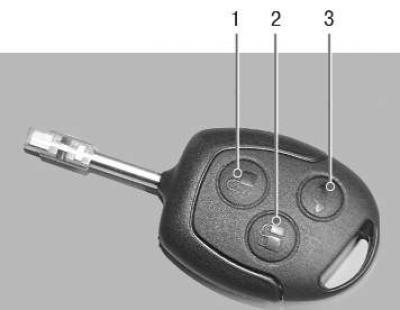
Fig. 10.4. Remote control: 1 – unlock button; 2 – lock button; 3 – tailgate release button
Unlocking door locks and disabling security mode using the remote control. To unlock the driver's door and turn off the security mode using the remote control, press the unlock button 1 (see Fig. 10.4) on the remote control. The direction indicators will flash twice, the security mode will turn off and only the driver's door will be unlocked.
Unlocking the tailgate lock with the remote control. To unlock the tailgate, press button 3 (see Fig. 10.4) on the remote control twice within three seconds.
When the security mode is on, unlocking occurs with simultaneous disabling of this security zone for 45 sec. If the tailgate is not opened during this period, it is automatically locked again, and if the tailgate was opened, this security zone is automatically disabled until it is closed.
To lock the trunk lid after closing, press button 3 on the remote control.
Programming the unlock function. To program the unlock function for the driver's door only or all doors simultaneously, press buttons 1 and 2 on the remote control simultaneously and hold them for four seconds (ignition must be off). The direction indicators will flash twice to confirm the command.
[The original text is provided on an online resource: FordBook.ru]