Contents: Removal ↳ Installation ↳
Thermostat
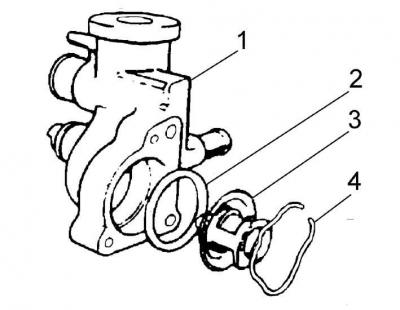
1 – thermostat housing, 2 – sealing ring, 3 – thermostat, 4 – spring clamp
Removal
1. Use a screwdriver to pry up the thermostat spring clip and remove the thermostat together with the sealing ring.
2. Disconnect the ground wire from the battery.
3. Drain the cooling system.
4. Disconnect the flexible cooling system pipes from the thermostat housing.
5. Remove the thermostat housing by unscrewing the two bolts that secure it.
Installation
1. Clean the mating surfaces of the thermostat housing and the engine cylinder head.
2. Insert the thermostat into the housing, new O-ring and spring clip.
3. Install the thermostat housing together with the new gasket into the engine cylinder head, tightening the mounting bolts to the appropriate torque.
4. Connect the flexible cooling system pipes to the thermostat housing.
5. Fill the system with coolant.
6. Connect the ground wire to the battery.
7. Start and warm up the engine, and also check the tightness of the cooling system connections.
8. After the engine has cooled down, check and, if necessary, top up the coolant level in the expansion tank.