Contents: For heater or heating - air… ↳ Blower switch ↳ Electronic Automatic Temperature… ↳ Control node ↳ Backlight lamp for the liquid… ↳ Solar sensor unit ↳ Internal sensor unit ↳ External sensor node ↳
For heater or heating - air conditioning systems with mechanical control only
Note: This procedure is only performed on vehicles with a heater (without air conditioning) and on vehicles with a mechanically controlled heating - air conditioning system. If your vehicle is equipped with an Electronic Automatic Temperature Control (EATC) system, see Section 16.
1. Disconnect the negative cable from the battery.
2. Remove the decorative trim from the instrument panel (see chapter 11).
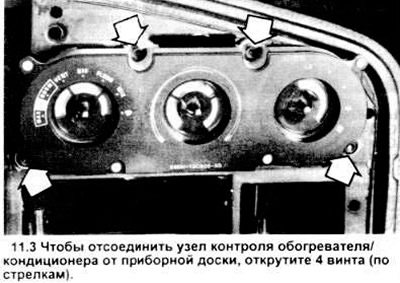
3. Unscrew the 4 screws connecting the control unit to the instrument panel (see figure).
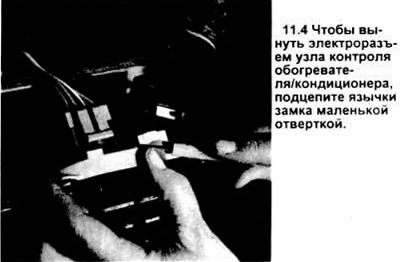
4. Pull the control unit out of the instrument panel opening and remove the electrical connectors (see figure).
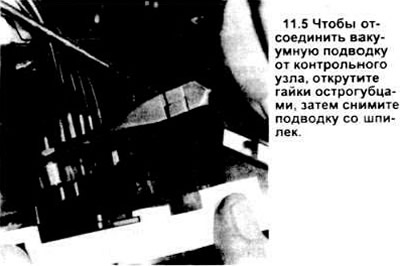
5. Unscrew the nuts securing the vacuum line from the rack (see figure), disconnect the vacuum line from the control unit.
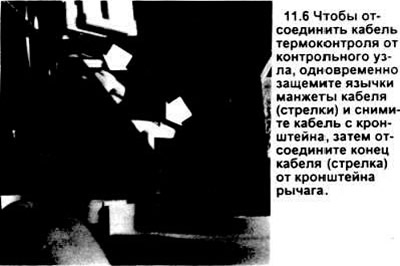
6. Disconnect the temperature control cable from the control unit (see figure).
7. Assemble in reverse order. Be sure to install new nuts on the connection of the vacuum supply line to the control unit.
Caution: The vacuum line nuts are push-fit, do not attempt to screw them onto the strut.
Blower switch
8. Disconnect the negative battery cable.
9. Remove the fan switch button from the switch panel by pulling it towards you.
10. Unscrew the control unit from the instrument panel (see above) and pull it out so that you can operate the blower switch.
11. Remove the electrical connectors from the switch.
12. If the vehicle is not equipped with air conditioning, remove the screw that connects the switch to the control unit and is located at the bottom of the control unit.
13. In vehicles equipped with air conditioning, this screw is located behind the control unit.
14 Remove the switch.
15. Assembly is carried out in reverse order.
Electronic Automatic Temperature Control System (EATC)
Note: testing of the EATS system is beyond the scope of this publication.
Control node
16. Disconnect the negative battery cable.
17. Pull out the lower left and right snap-on instrument panel trim panels. Remove the eight screws securing the upper trim panel (see chapter 11).
18. Pull the lower edge of the upper trim panel out of the dashboard. It is best to do this by hooking it by the lower left corner and pulling it out by moving your hands around the perimeter clockwise.
19. Remove the four screws (these may be Torx heads that require a special tool) securing the test head (see picture). Remove the test head from the instrument panel and position it so that the rear connectors are accessible.
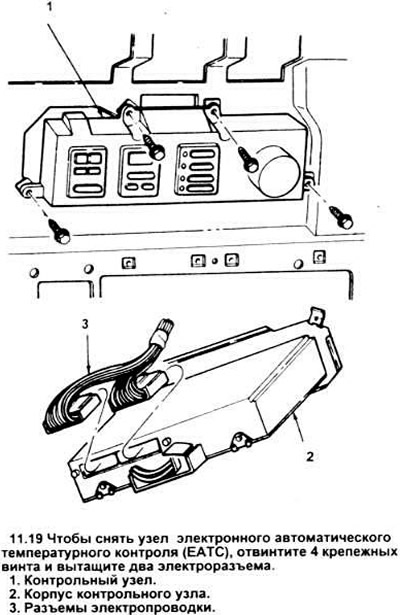
20. Disconnect the 2 electrical connectors from the control unit.
21. Unscrew the 2 nuts securing the vacuum line. Remove the control unit from the instrument panel.
22. Assembly is carried out in reverse order.
Backlight lamp for the liquid crystal display (LCD) of the control unit
Note: This procedure replaces the LCD display light bulb, it does not apply to the backlight bulbs or the indicator bulbs (LED). If the main control unit bulbs do not work, the control unit must be replaced.
23. Remove the control unit from the vehicle (see above).
24. Place it on a clean piece of cardboard.
25. Unscrew the two screws on the back of the case that secure the top cover (see figure).
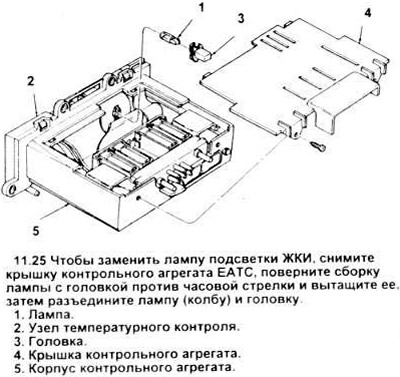
26. Lift the cover. Do not turn the module upside down.
Warning: Do not touch the circuit components and wires on the board. You may well have enough static electricity on you to ground and damage them if you touch them. Also, be careful with the rubber cable that runs from the switch assembly to the board - do not kink it.
27. A rectangular gray plastic bulb and its head unit protrude from the rear side of the switch assembly (see Figure 11.25). To remove them, carefully turn them counterclockwise with small pliers, without touching other parts. After moving the bulb head from its place with pliers, continue turning it manually, approximately 45 degrees. Then pull the bulb head out of the switch housing.
28. Remove the old flask from the socket and install a new flask (part number D4AZ - 13466 - A, trade number 37) into the socket instead.
29. Place the bulb with the head assembly into the switch housing and turn it 45 degrees clockwise until the head snaps into place. Do not use pliers when installing the head.
30. Subsequent assembly is carried out in the reverse order of disassembly.
Solar sensor unit
31. Disconnect the negative cable from the battery.
32. Remove the left decorative radio grille (see chapter 11) and remove the solar sensor assembly (see figure) from the two studs that hold it in place.
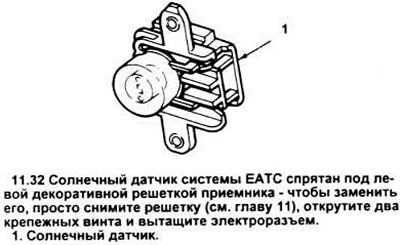
33. Pull out the solar sensor electrical connector.
34. Installation is carried out in reverse order.
Internal sensor unit
35. Disconnect the negative battery cable.
36. In Tauras vehicles, remove the right decorative panel assembly (see chapter 11). In Sable, lower the glove compartment by pressing down on the latches holding it in place.
37. Unscrew the two fastening screws of the sensor assembly (see figure).
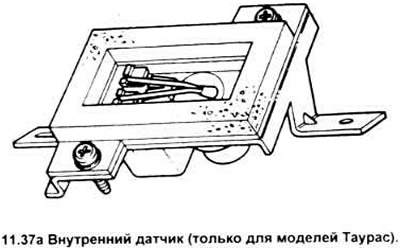
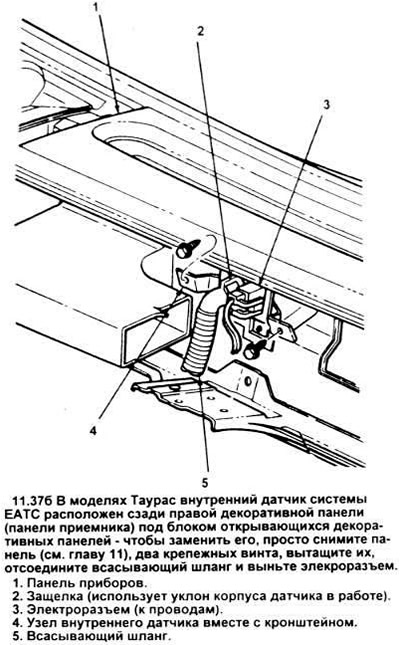
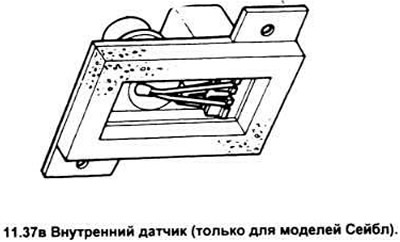
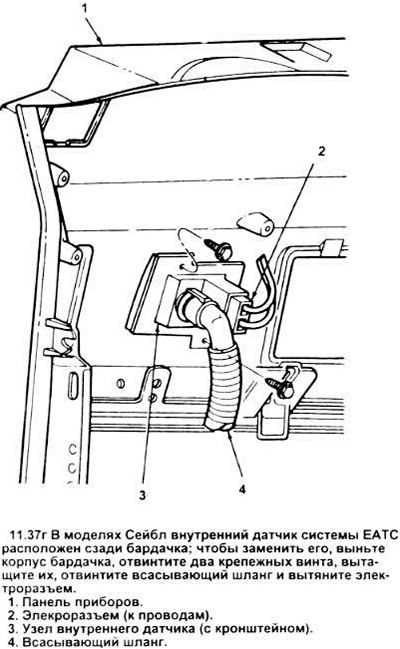
38. Pull out the electrical connector of the internal sensor.
39. Carefully open the latch and disconnect the suction hose from the internal sensor.
40. Installation of a new sensor is carried out in reverse order.
External sensor node
41. Disconnect the negative battery cable.
42. Open the hood and locate the external sensor assembly. It is mounted in front of the condenser on a bracket (see picture).
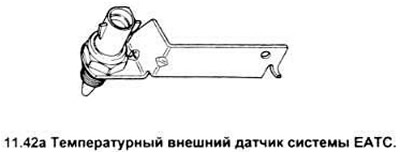
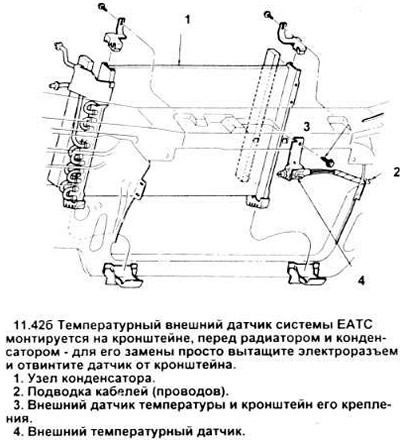
43. Unscrew the outer sensor mounting nut and remove the sensor.
44. Disconnect the electrical connector from the sensor.
45. Perform installation in reverse order.
The text of the article was copied from the website fordbook