By the way, this advice applies to all work in which the battery is disconnected from the vehicle's on-board network.


SEQUENCE OF WORKS
1. To avoid a short circuit during further work, first disconnect the wire from the negative terminal of the battery. To do this, unscrew the nut and disconnect the wire contact from the battery terminal.
2. Loosen the nut and disconnect the wire from the positive terminal of the battery.
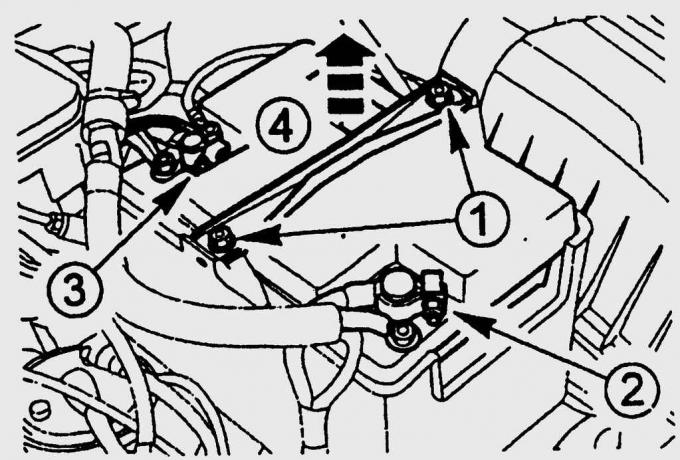
Fig. 15.8. Fastening the battery in the engine compartment with a bar (4), secured with nuts (1), and the connection points for the wires to the negative (3) and positive (2) terminals of the battery
3. Unscrew nuts 1 (Fig. 15.8) securing the battery bar and remove bar 4.
4. Remove the battery.
5. When installing, make sure that the battery is securely installed on the console (sliding of the battery will cause the lead plates to break).
6. First connect the wire to the positive terminal, then the wire to the negative terminal of the battery. The error in connecting the wires to the terminals is eliminated due to the fact that the terminals of the battery are of different diameters.
7. To prevent the formation of sulfates, lubricate the terminals with Vaseline or a special grease for batteries.
8. Turn on the radio and enter the code into it.
(The text is available on the specified website info portal: «FORDBOOK.ru»)