Electrical equipment and devices of the car Ford Fiesta 2

General information about the battery
The battery does not require maintenance and topping up with distilled water. The battery must be kept clean. Regularly check the fastening of the wire tips. Always...
The battery does not require maintenance and topping up with distilled water. The battery must be kept clean. Regularly check the fastening of the wire tips. Always...
Checking the generator operation
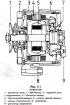
Fig. 7.1 shows a section of the generator. The generator has a built-in electronic voltage regulator and is driven by a V-belt. The drive belt pulley is located on the...
Fig. 7.1 shows a section of the generator. The generator has a built-in electronic voltage regulator and is driven by a V-belt. The drive belt pulley is located on the...

Checking the regulated voltage
Connect the voltmeter to the positive ("+") battery terminal and to ground. Start the engine and set the speed to about 2000 rpm. The voltmeter under these conditions...
Connect the voltmeter to the positive ("+") battery terminal and to ground. Start the engine and set the speed to about 2000 rpm. The voltmeter under these conditions...
Removing and installing the generator
Disconnect all electrical wires from the generator. Remove the V-belt. Unscrew the bracket mounting bolts and remove the generator. The generator is installed in reverse...
Disconnect all electrical wires from the generator. Remove the V-belt. Unscrew the bracket mounting bolts and remove the generator. The generator is installed in reverse...

Checking the starter operation
Fig. 7.3 shows the starter disassembled into parts. Checking the starter operation To test the starter installed on the vehicle, the battery must be fully charged. Check...
Fig. 7.3 shows the starter disassembled into parts. Checking the starter operation To test the starter installed on the vehicle, the battery must be fully charged. Check...

Starter replacement
Disconnect the vehicle ground cable from the battery clamp. Disconnect the electrical wires from the starter. Unscrew the three bolts shown in Fig. 7.4. The new starter...
Disconnect the vehicle ground cable from the battery clamp. Disconnect the electrical wires from the starter. Unscrew the three bolts shown in Fig. 7.4. The new starter...

Headlights and windshield wipers
Place the vehicle on a horizontal surface at a distance of 10 mm from a vertical wall. The vehicle must have a full tank of fuel and be unloaded. Draw on the wall the...
Place the vehicle on a horizontal surface at a distance of 10 mm from a vertical wall. The vehicle must have a full tank of fuel and be unloaded. Draw on the wall the...

Removing and installing the windshield wiper motor
Disconnect the multi-pin connector plug from the windshield wiper motor. Unscrew the three bolts of the motor mounting plate (Fig. 7.7). Remove the motor from the hole...
Disconnect the multi-pin connector plug from the windshield wiper motor. Unscrew the three bolts of the motor mounting plate (Fig. 7.7). Remove the motor from the hole...

Heating and ventilation
Fig. 7.9 shows the order of air distribution in the body. The air needed for ventilation and heating of the car interior is taken in the front part of the car. The...
Fig. 7.9 shows the order of air distribution in the body. The air needed for ventilation and heating of the car interior is taken in the front part of the car. The...

Removing and installing the heater
Disconnect the ground wire from the battery clamp. Loosen the clamps on the flexible hoses. Disconnect the elastic hoses of the heating system from the heater (Fig....
Disconnect the ground wire from the battery clamp. Loosen the clamps on the flexible hoses. Disconnect the elastic hoses of the heating system from the heater (Fig....

Removing and installing the heater fan
Disconnect the vehicle's ground cable from the battery. Remove the six screws securing the air flow guide. Remove the metal cover with the engine cover lock. Remove the...
Disconnect the vehicle's ground cable from the battery. Remove the six screws securing the air flow guide. Remove the metal cover with the engine cover lock. Remove the...

Replacing fuses and relays
Replacing fuses The fuse box is located on the left side of the front panel. After removing the box cover, access to the fuses is available. The relays used for control...
Replacing fuses The fuse box is located on the left side of the front panel. After removing the box cover, access to the fuses is available. The relays used for control...
This section is available on russian, bulgarian, belarusian, ukrainian, serbian, croatian, romanian, polish, slovak, hungarian
See other similar sections for Ford cars:
• General information: Maintenance Ford Focus 2 (2004-2010)
• General information: Maintenance and care Ford Mondeo 2 (1997-2000)
• General information: Maintenance Ford Escort 3 (1980-1985)
• General information: Maintenance Ford Taurus 1 and 2 (1986-1994)
• General information: Maintenance Ford Focus 2 (2004-2010)
• General information: Maintenance and care Ford Mondeo 2 (1997-2000)
• General information: Maintenance Ford Escort 3 (1980-1985)
• General information: Maintenance Ford Taurus 1 and 2 (1986-1994)
Fiesta 4
Fiesta 2
- General information
- Characteristics
- Working conditions and tools
- Car care
- Power unit
- Engine repair
- Lubrication system
- Cooling system
- Air filter
- Fuel injection system
- Ignition system
- Supply system
- Exhaust system
- Transmission
- Chassis
- Car suspension
- Steering
- Wheels and tires
- Brake system
- Body
- Interior
- Exterior
- Electrical equipment
- Light and appliances
- Battery and alternator
Fiesta 2
- General information
- Characteristics
- Maintenance
- Engine
- Disassembly and assembly
- Block head
- Connecting rod and piston group
- Lubrication system
- Gas distribution system
- Cooling system
- Supply system
- Diesel power system
- Ignition system
- Transmission
- Clutch
- Mechanical gearbox
- Automatic gearbox
- Drive shafts
- Suspension and chassis
- Front suspension
- Rear suspension
- Steering
- Brake system
- Electrical equipment
- Equipment and devices
- Electrical equipment diagrams