Shift Lever Assembly
1. Using a small screwdriver, remove the medallion from the handle button and unscrew the handle button locking screw (see figure).
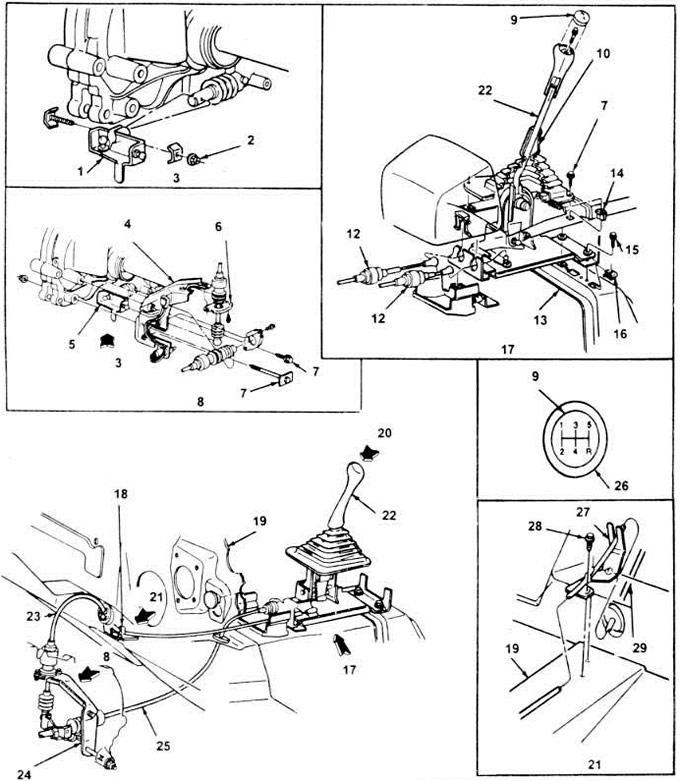
3.1. Layout plan of gear shift elements.
1. Bracket assembly.
2. Nut.
3. Type V.
4. Bracket.
5. Bracket.
6. Plate.
7. Bolt.
8. View W.
9. Medallion.
10. Casing.
11. Bolt.
12. Traction (cable).
13. Floor panel assembly.
14. "Pistons" (4 pieces).
15. Bolt (4 pieces).
16. Clinch nut (4 pieces).
17. View X.
18. Bracket for shift cable (cable).
19. Instrument panel.
20. View Y.
21. View Z.
22. Handle and casing.
23. Shift cable.
24. Switch and bracket.
25. Selector cable (rope).
26. Button.
27. Bracket.
28. Bolt (2 pieces).
29. Cable (rope).
2. Additionally, remove the console applique, and then unscrew the four screws connecting the ends to the console. Remove the cover and handle from the lever.
3. Remove the console (chapter 11).
4. Unscrew the four bolts securing the switch to the floor panel, press the two clamps holding the switch cable to the control unit; use a screwdriver to disconnect the control unit's rotating spheres. Do not bend or damage the cables.
5. When installing, lower the ends of the cables into the grooves of the control unit, focusing on the green mark applied to the lever. Screw in the control unit mounting bolts and tighten them securely.
6. Insert the cable insulators into the slots of the lever and secure them with clamps. Use a wooden mallet to install the clamps.
7. Use pliers to snap the lever cable sockets onto the ball (spherical) joints.
8. Install the console.
9. Pull the shift handle cover, install the button on the handle, tighten the screws.
10. After screwing the button, put the applique in place.
11. Install the console application.
Shifter Cables and Bracket Assemblies
12. Remove the console handle and the cover with the button.
13. Pull the carpet off the dashboard to gain access to the cables.
14. Remove the rear seat heater line.
15. Loosen the two set screws and remove the cable bracket (see Figure 3.1).
16. Loosen the cable seals and disconnect them from the floor panel and from the instrument panel.
17. Raise the car and place it on stands.
18. From under the vehicle, remove the two stoppers securing the cables to the switch and bracket assembly.
19. Using a screwdriver, remove the cable heads from the clamps of the swivel ball joints, pull the cable insulators out of the bracket grooves.
20. Loosen and remove the two mounting bolts and remove the shifter and bracket from the transmission housing.
21. Loosen the nut that secures the clamp to the inner rod of the switch and remove the clamp.
22. Pull the shifter cables out through the interior and remove them completely.
23. When installing, thread the cables from the passenger compartment. The engagement cable goes through the hole in the instrument panel, and the selector cable goes through the hole in the tunnel. Make sure that the ends of the cables, together with the closed casings, are pulled through the holes, and the seals "sit" tightly.
24. Install the cable bracket and screws. Tighten the screws securely, making sure the shift cable is hooked onto the bracket hook.
25. Install the heater pipe under the rear seat, put the floor mat in place.
26. Replace the shift lever assembly.
For more information, please visit the website: fordbook